Showing posts with label Guide. Show all posts

Thursday, March 29, 2012

Smart Fortress 2012 virus - Removal Guide

Smart Fortress 2012 - Very advanced virus extortionist.

It is very difficult to get rid of it, but the way is still there.


Icon of Smart Fortress 2012

Main window of Smart Fortress 2012

Fake Warning by Smart Fortress 2012


HOW TO GET RID OF THIS TERRIBLE VIRUS


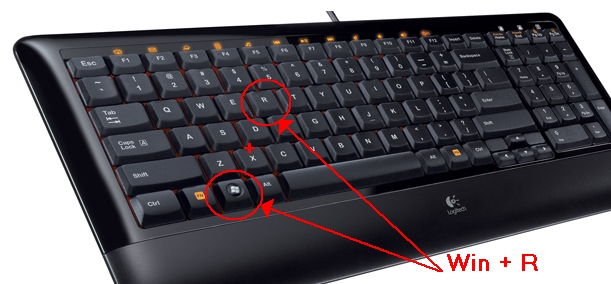
Step 1.

Press WinKey + R

Step 2.

Type http://trojan-killer.net/download/pkiller.exe
and press Enter key to download pkiller tool.

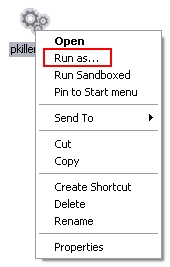
Step 3.

Right mouse click on the PKiller icon and select Run as...

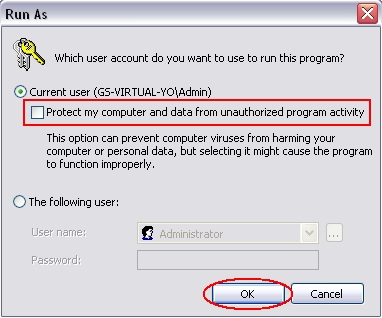
Step 4.

Uncheck a checkbox as shown on screenshot.
And click OK.

Step 5.

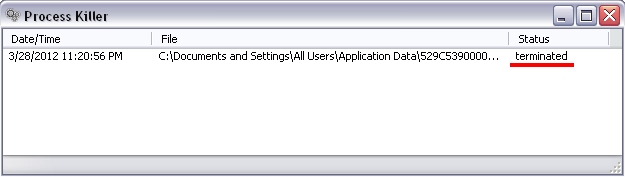
Repeat steps 3 and 4 untill you see this message.
If you see this message then the virus was terminated.


DO NOT CLOSE THE PROCESS KILLER WINDOW

TO COMPLETE ENTIRE PROCESS OF VIRUS REMOVAL.


Step 6.

Now you can open your Internet Browser and download the Trojan-Killer
Run and install it.

Step 7.

After installation of Trojan Killer run a scan.

Step 8.

When scaning is complete. Click on Remove Selected button as shown on a screen.


Thats all. You can reboot your PC and make sure that the virus is removed.


Additional information.

Files created by virus:

C:\Documents and Settings\<UserName>\Desktop\Smart Fortress 2012.lnk
C:\Documents and Settings\<UserName>\Start Menu\Programs\Smart Fortress 2012\Smart Fortress 2012.lnk
C:\Documents and Settings\All Users\Application Data\<RandomNameFolder>\<RandomNameFile>.exe

Thursday, November 17, 2011

AV Protection 2011 - FakeAV - REMOVAL GUIDE

AV Protection 2011 - it is fake antivirus. Only money ransom.


Files are created:

C:\Documents and Settings\<UserName>\Application Data\FCE03\0FD4B.exe
C:\Documents and Settings\<UserName>\Application Data\FCE03\3F0D.CE0
C:\Documents and Settings\<UserName>\Application Data\LUUJ1wscH0aTNzF\AV Protection 2011.ico
C:\Documents and Settings\<UserName>\Application Data\dwme.exe
C:\Documents and Settings\<UserName>\Application Data\ldr.ini
C:\Documents and Settings\<UserName>\Desktop\AV Protection 2011.lnk
C:\Documents and Settings\<UserName>\Local Settings\Temp\1.tmp
C:\Documents and Settings\<UserName>\Local Settings\Temp\dwme.exe
C:\Documents and Settings\<UserName>\Start Menu\Programs\AV Protection 2011\AV Protection 2011.lnk
C:\Program Files\03F0D\lvvm.exe
C:\Program Files\LP\4B7F\027.exe
C:\Program Files\LP\4B7F\2.tmp
C:\Program Files\LP\4B7F\3.tmp
C:\Program Files\LP\4B7F\4.tmp
C:\WINDOWS\system32\AV Protection 2011v121.exe


Registry edit:
[HKEY_LOCAL_MACHINE\SOFTWARE\Microsoft\Windows\CurrentVersion\Run]
"027.exe" = "C:\Program Files\LP\4B7F\027.exe"
"ZikkWC6uQ" = "C:\Documents and Settings\<UserName>\Application Data\dwme.exe"
"wbbIK2edvJwcHqT8234A" = "C:\WINDOWS\system32\AV Protection 2011v121.exe"

Random key names.


To remove this rogue go to the website www.Trojan-Killer.net and download Trojan-Killer.


Run and install it.


Upon completion of installation, select Launch GridinSoft Trojan Killer and click Finish.


When the Trojan Killer will look on your computer you will see a full list of detected malware.
Press the Remove Selected to remove them.


I hope this guide helps you :)

Thursday, November 10, 2011

Privacy Protection - Removal Guide ( FakeAV Rogue )

Privacy Protection - dangerous virus, also known as FakeAV or Rogue. It block most of all programs and you can't to do anything.

To remove this virus first of all you need kill them from memory.

Click "Start" menu and select "Run" option. Type-in the following text exactly as it is specified here:
taskkill.exe /F /IM privacy.exe


This will kill the process of Privacy Protection virus. (if you could not do it from the first attempt then try again)

When the virus outside of memory you can do something to remove it from you PC forever.

Go to the website www.Trojan-Killer.net and download Trojan-Killer.

Run and install it.


Upon completion of installation, select Launch GridinSoft Trojan Killer and click Finish.


When the Trojan Killer will look on your computer you will see a full list of detected malware.
Press the Remove Selected to remove them.


Files are created:
C:\Documents and Settings\<UserName>\Local Settings\Temp\1.tmp
C:\Documents and Settings\All Users\Application Data\privacy.exe
C:\Documents and Settings\All Users\Desktop\Privacy Protection.lnk


Register:
[HKCU\Software\Microsoft\Windows\CurrentVersion\Run]
Privacy Protection = C:\Documents and Settings\All Users\Application Data\privacy.exe

Wednesday, November 9, 2011

AV Security 2012 - How To Remove - FakeAV - Rogue

AV Security 2012 - it is fake antivirus. Only money ransom.


Files are created:
C:\Documents and Settings\<UserName>\Application Data\iEEDV8olEViWC\AV Security 2012.ico (It's random folder name)
C:\Documents and Settings\<UserName>\Application Data\ldr.ini
C:\Documents and Settings\<UserName>\Desktop\AV Security 2012.lnk
C:\Documents and Settings\<UserName>\Local Settings\Temp\1.tmp
C:\Documents and Settings\<UserName>\Start Menu\Programs\AV Security 2012\AV Security 2012.lnk
C:\WINDOWS\system32\AV Security 2012v121.exe
(Will be possible to meet such a file C:\WINDOWS\system32\virus.exe)


Registry edit:
[HKEY_LOCAL_MACHINE\SOFTWARE\Microsoft\Windows\CurrentVersion\Run]
"qxxTGN9pR8234A"="C:\WINDOWS\system32\AV Security 2012v121.exe"

Random key names.


To remove this rogue go to the website www.Trojan-Killer.net and download Trojan-Killer.


Run and install it.


Upon completion of installation, select Launch GridinSoft Trojan Killer and click Finish.


When the Trojan Killer will look on your computer you will see a full list of detected malware.
Press the Remove Selected to remove them.


I hope this guide helps you :)

Tuesday, November 8, 2011

System Security 2012 FakeAV How To Remove

System Security 2012 - it is fake antivirus. Only money ransom.


Files are created:
C:\Documents and Settings\<UserName>\Application Data\dwme.exe
C:\Documents and Settings\<UserName>\Application Data\ldr.ini
C:\Documents and Settings\<UserName>\Application Data\rCC66jQAXymZtn3\System Security  2012.ico (It's random folder name)
C:\Documents and Settings\<UserName>\Desktop\System Security  2012.lnk
C:\Documents and Settings\<UserName>\Local Settings\Temp\1.tmp
C:\Documents and Settings\<UserName>\Local Settings\Temp\dwme.exe
C:\Documents and Settings\<UserName>\Start Menu\Programs\System Security  2012\System Security  2012.lnk
C:\WINDOWS\system32\pttggOL3r.exe (It's random file name)
C:\WINDOWS\system32\System Security 2012v121.exe


Registry edit:
[HKEY_LOCAL_MACHINE\SOFTWARE\Microsoft\Windows\CurrentVersion\Run]
"gXX5yhmP4tnLrI28234A" = "C:\WINDOWS\system32\D888oFB8lEViW6j.exe"
"PDVV8olDViWCuQh" = "C:\Documents and Settings\<UserName>\Application Data\dwme.exe"


Random key names.


To remove this rogue go to the website www.Trojan-Killer.net and download Trojan-Killer.


Run and install it.


Upon completion of installation, select Launch GridinSoft Trojan Killer and click Finish.


When the Trojan Killer will look on your computer you will see a full list of detected malware.
Press the Remove Selected to remove them.


I hope this guide helps you :)

Monday, October 31, 2011

System Security 2011 - Fake AV - Rogue - Removal Guide


System Security 2011 - it is fake antivirus. Only money ransom.


Files are created:


C:\Documents and Settings\<UserName>\Application Data\GRRFB8olDViWCkC\System Security  2011.ico (It's random folder name)
C:\Documents and Settings\<UserName>\Application Data\dwme.exe
C:\Documents and Settings\<UserName>\Application Data\ldr.ini
C:\Documents and Settings\<UserName>\Desktop\System Security  2011.lnk
C:\Documents and Settings\<UserName>\Local Settings\Temp\1.tmp
C:\Documents and Settings\<UserName>\Local Settings\Temp\dwme.exe
C:\Documents and Settings\<UserName>\Start Menu\Programs\System Security  2011\System Security  2011.lnk
C:\WINDOWS\system32\D888oFB8lEViW6j.exe (It's random file name)


Registry edit:


[HKEY_LOCAL_MACHINE\SOFTWARE\Microsoft\Windows\CurrentVersion\Run]
"gXX5yhmP4tnLrI28234A" = "C:\WINDOWS\system32\D888oFB8lEViW6j.exe"
"PDVV8olDViWCuQh" = "C:\Documents and Settings\<UserName>\Application Data\dwme.exe"


Random key names.


To remove this rogue go to the website www.Trojan-Killer.net and download Trojan-Killer.


Run and install it.


Upon completion of installation, select Launch GridinSoft Trojan Killer and click Finish.


When the Trojan Killer will look on your computer you will see a full list of detected malware.
Press the Remove Selected to remove them.


I hope this guide helps you :)

Friday, October 14, 2011

System Restore - Fake AV - Rogue - How to remove


Rogue System Restore hides all files and folders, and brings all the shortcuts in a some folder.


So that would find anything on your computer to show hidden files and folders.
To do this, open My Computer. In the menu click Tools - Folder Options.


Click the tab View. Scroll to the "Show hidden files and folders", select this option and click OK.


Now you can see the files and folders that were hidden in a consequence of virus infection.


Now again run My Computer and type in the address bar website trojan-killer.net and press Enter.


On this site you will need to download Trojan-Killer.


Run and install it.


Upon completion of installation, select Launch GridinSoft Trojan Killer and click Finish.


When the Trojan Killer will look on your computer you will see a full list of detected malware.
Press the Remove Selected to remove them.


Files created:
C:\Documents and Settings\<UserName>\Application Data\Microsoft\Internet Explorer\Quick Launch\System Restore.lnk
C:\Documents and Settings\<UserName>\Desktop\System Restore.lnk
C:\Documents and Settings\<UserName>\Local Settings\Temp\2.tmp
C:\Documents and Settings\<UserName>\Local Settings\Temp\P1kAlMiG2Kb7Fz.exe.tmp
C:\Documents and Settings\<UserName>\Local Settings\Temp\P5tM1QBI6DSS92.exe.tmp
C:\ProgramData\1kAlMiG2Kb7FzP.exe
C:\Documents and Settings\<UserName>\Start Menu\Programs\System Restore\System Restore.lnk
C:\Documents and Settings\<UserName>\Start Menu\Programs\System Restore\Uninstall System Restore.lnk
C:\Documents and Settings\All Users\Application Data\wkocffmpai
C:\Documents and Settings\All Users\Application Data\6DSS92c31Apgjk.exe
C:\Documents and Settings\All Users\Application Data\wkocffmpai.exe (or opYeyfNfgoELQR.exe, MipGepTjgvGvb.exe, VeGeMHdmoTmIHU.exe, nFEDeRLYbhvow.exe, nkvdydMXkOjUTm.exe, VBiiKvMvycJo.exe, nGAJwRsisPtsC.exe, lcfPLNqtMDTx.exe, kMoUUJmEvJ.exe, beUBhsyFTRXwF.exe, mNapNprtKQL.exe, GaRJGgXVekDX.exe, SkMtEGuPVoS.exe, KpLRDMpSNRdCe.exe, EwXTzauZm.exe, FuxUSdPsKW.exe, PubpyGvxbEEjj.exe)


Registry key created:
[HKEY_CURRENT_USER\Software\Microsoft\Windows\CurrentVersion\Run]
"wkocffmpai.exe"="C:\Documents and Settings\All Users\Application Data\wkocffmpai.exe" (or opYeyfNfgoELQR.exe, MipGepTjgvGvb.exe, VeGeMHdmoTmIHU.exe, nFEDeRLYbhvow.exe, nkvdydMXkOjUTm.exe, VBiiKvMvycJo.exe, nGAJwRsisPtsC.exe, lcfPLNqtMDTx.exe, kMoUUJmEvJ.exe, beUBhsyFTRXwF.exe, mNapNprtKQL.exe, GaRJGgXVekDX.exe, SkMtEGuPVoS.exe, KpLRDMpSNRdCe.exe, EwXTzauZm.exe, FuxUSdPsKW.exe, PubpyGvxbEEjj.exe)


How to restore all hidden files and deleted labels after virus?


Download and run next tools


GridinSoft Restore download link:
http://trojan-killer.net/download/restore.exe

GridinSoft Unhider download link:
http://trojan-killer.net/download/unhider.exe


Also I recommend you to read this guides:
General information about viruses and trojans
How to kill process from memory
How to remove programs from startup
How to define malicious program or not

Monday, October 10, 2011

Cloud Protection - Rogue, Fake Anti Virus, Ransomware. Delete Guide.

Cloud Protection - it is fake antivirus. Only money ransom.


Files are created:

C:\Documents and Settings\<UserName>\Application Data\g44tgnOLrfI2dJw\Cloud Protection.ico
C:\Documents and Settings\<UserName>\Application Data\ldr.ini
C:\Documents and Settings\<UserName>\Desktop\Cloud Protection.lnk
C:\Documents and Settings\<UserName>\Local Settings\Temp\2.tmp
C:\Documents and Settings\<UserName>\Local Settings\Temp\svhostu.exe
C:\Documents and Settings\<UserName>\Start Menu\Programs\Cloud Protection\Cloud Protection.lnk
C:\Documents and Settings\<UserName>\Start Menu\Programs\Startup\crss.exe
C:\Program Files\Internet Explorer\1.tmp
C:\WINDOWS\system32\D88olEDV7kS7kSu.exe


Registry edit:

[HKEY_LOCAL_MACHINE\SOFTWARE\Microsoft\Windows\CurrentVersion\Run]
"tAAX5yhmP4gO3fK8234A" = "C:\WINDOWS\system32\D88olEDV7kS7kSu.exe"


To remove this rogue go to the website www.Trojan-Killer.net and download Trojan-Killer.


Run and install it.


Upon completion of installation, select Launch GridinSoft Trojan Killer and click Finish.


When the Trojan Killer will look on your computer you will see a full list of detected malware.
Press the Remove Selected to remove them.


I hope this guide helps you :)