Showing posts with label how to remove. Show all posts

Monday, January 23, 2012

Smart Protection 2012 - FAKE AV - ROGUE

Smart Protection 2012 - FAKE AV - Removal Guide


Files created:

C:\Documents and Settings\<UserName>\Desktop\Smart Protection 2012.lnk
C:\Documents and Settings\<UserName>\Start Menu\Programs\Smart Protection 2012\Smart Protection 2012.lnk
C:\Documents and Settings\All Users\Application Data\<RandomFolder>\<RandomNumericFile>.exe


Register edit:
HKCU\Software\Microsoft\Windows\CurrentVersion\RunOnce\<RandomNumericName> C:\Documents and Settings\All Users\Application Data\<RandomFolder>\<RandomNumericFile>.exe
HKCU\Software\Microsoft\Windows\CurrentVersion\Uninstall\Smart Protection 2012\DisplayIcon C:\Documents and Settings\All Users\Application Data\<RandomFolder>\<RandomNumericFile>.exe,0
HKCU\Software\Microsoft\Windows\CurrentVersion\Uninstall\Smart Protection 2012\DisplayName Smart Protection 2012
HKCU\Software\Microsoft\Windows\CurrentVersion\Uninstall\Smart Protection 2012\ShortcutPath "C:\Documents and Settings\All Users\Application Data\<RandomFolder>\<RandomNumericFile>.exe" Uninstall
HKCU\Software\Microsoft\Windows\CurrentVersion\Uninstall\Smart Protection 2012\UninstallString "C:\Documents and Settings\All Users\Application Data\<RandomFolder>\<RandomNumericFile>.exe" Uninstall

How to remove Smart Protection 2012
First of all you should download anti-trojan software Trojan-Killer.


Virus can block any runing programs. But you can rename install of trojan-killer to "explorer.exe" and it's should be run normally.


Run and install it.


Upon completion of installation, uncheck the Launch GridinSoft Trojan Killer checkbox and click Finish.


Why we did not run Trojan-Killer after installation? Becouse Smart Protection 2012 block all application exclude explorer.exe.

Next step to delete Smart Protection 2012 will be rename of Trojan-Killer to explorer.exe :)
Go to the folder where Trojan-Killer installed and rename "trojankiller.exe" to "explorer.exe".


Then you can run Trojan-Killer and scan your system.

When the Trojan Killer will look on your computer you will see a full list of detected malware.
Press the Remove Selected to remove them.


Wednesday, December 28, 2011

Super AV - Fake AV - rogue

Super AV - Fake AV - Rogue


Files:
C:\WINDOWS\atexbees.exe


Register:

[HKEY_LOCAL_MACHINE\SOFTWARE\Microsoft\Windows\CurrentVersion\Run]
"Security" = "C:\Windows\atexbees.exe"

Wednesday, December 14, 2011

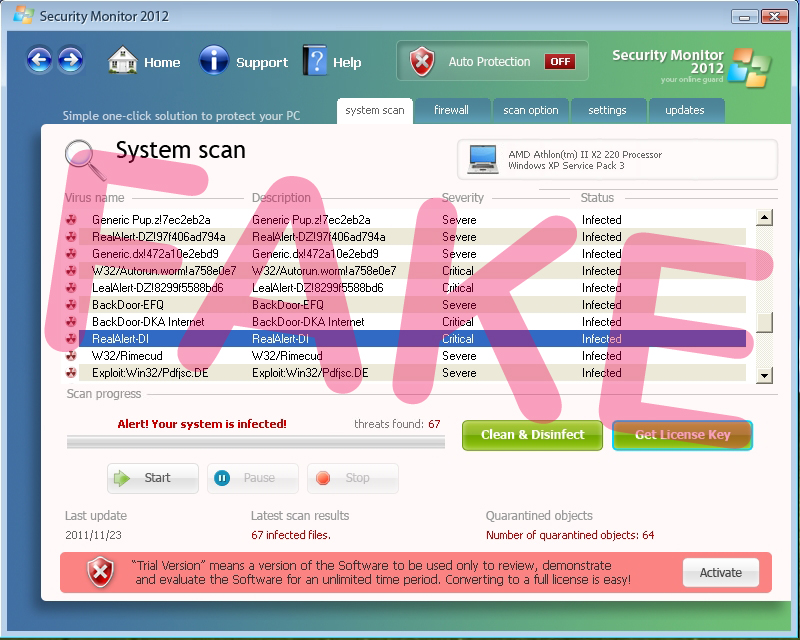
Security Monitor 2012

Security Monitor 2012 - it's fake antivirus. It's a rogue that found false detects on your PC and ransom money for healing computer.


Virus create next files:
%AppData%\Microsoft\Internet Explorer\Quick Launch\Security Monitor.lnk
%AppData%\Security Monitor\IcoActivate.ico
%AppData%\Security Monitor\IcoHelp.ico
%AppData%\Security Monitor\IcoUninstall.ico
%AppData%\Security Monitor\Security Monitor.exe
%AppData%\Security Monitor\securityhelper.exe
%AppData%\Security Monitor\securitymanager.exe
%Desktopdir%\Security Monitor.lnk
%StartMenu%\Programs\Security Monitor\Activate Security Monitor.lnk
%StartMenu%\Programs\Security Monitor\Help Security Monitor.lnk
%StartMenu%\Programs\Security Monitor\How to Activate Security Monitor.lnk
%StartMenu%\Programs\Security Monitor\Security Monitor.lnk
%StartMenu%\Programs\Security Monitor.lnk

Registry edit:
[HKEY_CURRENT_USER\Software\Microsoft\Windows\CurrentVersion\Run]
[Security Monitor] = "\"C:\\Documents and Settings\\Admin\\Application Data\\Security Monitor\\Security Monitor.exe\" /STARTUP"
[Security Monitor 2012 Security] = "C:\\Documents and Settings\\Admin\\Application Data\\Security Monitor\\securitymanager.exe"


Remove this virus very easy. Just read next guides:

I hope my guides help you to clean your PC from viruses and trojans.

Thursday, November 17, 2011

AV Protection 2011 - FakeAV - REMOVAL GUIDE

AV Protection 2011 - it is fake antivirus. Only money ransom.


Files are created:

C:\Documents and Settings\<UserName>\Application Data\FCE03\0FD4B.exe
C:\Documents and Settings\<UserName>\Application Data\FCE03\3F0D.CE0
C:\Documents and Settings\<UserName>\Application Data\LUUJ1wscH0aTNzF\AV Protection 2011.ico
C:\Documents and Settings\<UserName>\Application Data\dwme.exe
C:\Documents and Settings\<UserName>\Application Data\ldr.ini
C:\Documents and Settings\<UserName>\Desktop\AV Protection 2011.lnk
C:\Documents and Settings\<UserName>\Local Settings\Temp\1.tmp
C:\Documents and Settings\<UserName>\Local Settings\Temp\dwme.exe
C:\Documents and Settings\<UserName>\Start Menu\Programs\AV Protection 2011\AV Protection 2011.lnk
C:\Program Files\03F0D\lvvm.exe
C:\Program Files\LP\4B7F\027.exe
C:\Program Files\LP\4B7F\2.tmp
C:\Program Files\LP\4B7F\3.tmp
C:\Program Files\LP\4B7F\4.tmp
C:\WINDOWS\system32\AV Protection 2011v121.exe


Registry edit:
[HKEY_LOCAL_MACHINE\SOFTWARE\Microsoft\Windows\CurrentVersion\Run]
"027.exe" = "C:\Program Files\LP\4B7F\027.exe"
"ZikkWC6uQ" = "C:\Documents and Settings\<UserName>\Application Data\dwme.exe"
"wbbIK2edvJwcHqT8234A" = "C:\WINDOWS\system32\AV Protection 2011v121.exe"

Random key names.


To remove this rogue go to the website www.Trojan-Killer.net and download Trojan-Killer.


Run and install it.


Upon completion of installation, select Launch GridinSoft Trojan Killer and click Finish.


When the Trojan Killer will look on your computer you will see a full list of detected malware.
Press the Remove Selected to remove them.


I hope this guide helps you :)