Showing posts with label killer. Show all posts

Thursday, March 29, 2012

Smart Fortress 2012 virus - Removal Guide

Smart Fortress 2012 - Very advanced virus extortionist.

It is very difficult to get rid of it, but the way is still there.


Icon of Smart Fortress 2012

Main window of Smart Fortress 2012

Fake Warning by Smart Fortress 2012


HOW TO GET RID OF THIS TERRIBLE VIRUS


Step 1.

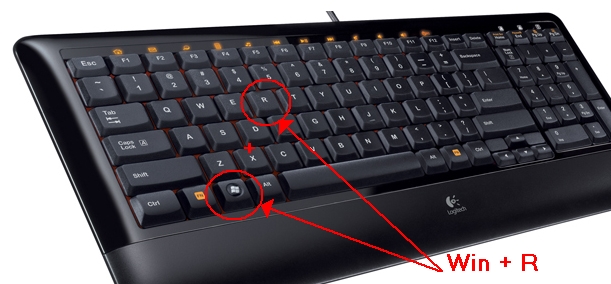
Press WinKey + R

Step 2.

Type http://trojan-killer.net/download/pkiller.exe
and press Enter key to download pkiller tool.

Step 3.

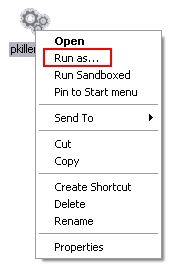
Right mouse click on the PKiller icon and select Run as...

Step 4.

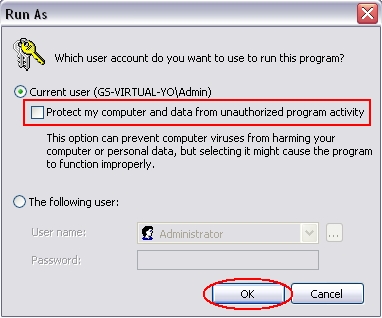
Uncheck a checkbox as shown on screenshot.
And click OK.

Step 5.

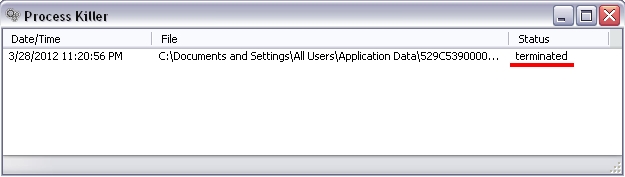
Repeat steps 3 and 4 untill you see this message.
If you see this message then the virus was terminated.


DO NOT CLOSE THE PROCESS KILLER WINDOW

TO COMPLETE ENTIRE PROCESS OF VIRUS REMOVAL.


Step 6.

Now you can open your Internet Browser and download the Trojan-Killer
Run and install it.

Step 7.

After installation of Trojan Killer run a scan.

Step 8.

When scaning is complete. Click on Remove Selected button as shown on a screen.


Thats all. You can reboot your PC and make sure that the virus is removed.


Additional information.

Files created by virus:

C:\Documents and Settings\<UserName>\Desktop\Smart Fortress 2012.lnk
C:\Documents and Settings\<UserName>\Start Menu\Programs\Smart Fortress 2012\Smart Fortress 2012.lnk
C:\Documents and Settings\All Users\Application Data\<RandomNameFolder>\<RandomNameFile>.exe

Wednesday, October 12, 2011

Security Sphere 2012 - Rogue Fake AV - How to remove

Security Sphere 2012 - Fake AV. Removal Guide.


Files Created: 


C:\Documents and Settings\All Users\Application Data\kL05366HhJaC05366\kL05366HhJaC05366.exe


Registry edit:


HKCU\Software\Microsoft\Windows\CurrentVersion\RunOnce
Key: "kL05366HhJaC05366" = "C:\Documents and Settings\All Users\Application Data\kL05366HhJaC05366\kL05366HhJaC05366.exe"


How to remove Security Sphere 2012.
First of all you should download anti-trojan software Trojan-Killer.


Run and install it.


Upon completion of installation, uncheck the Launch GridinSoft Trojan Killer checkbox and click Finish.


Why we did not run Trojan-Killer after installation? Becouse Security Sphere 2012 block all application exlude explorer.exe.

Next step to delete Security Sphere 2012 will be rename of Trojan-Killer to explorer.exe :)
Go to the folder where Trojan-Killer installed and rename trojankiller.exe to explorer.exe.


Then you can run Trojan-Killer and scan your system.

When the Trojan Killer will look on your computer you will see a full list of detected malware.
Press the Remove Selected to remove them.


I hope this guide helps you to kill Rogue Security Sphere 2012 :)